Shrink .PPT, .DOC, .XLS, .ODT & more!
PowerShrink 4.0 lets you quickly and easily compress working files for superior results — and savings.
PowerShrink’s easy-to-use GUI interface makes working with presentations, documents, spreadsheets and graphic files efficient and uncomplicated.
PowerShrink keeps the original functionality, layout and format!
Product Information
PowerShrink is Freeware!
Version: 4.0
System requirements:
Windows 98, ME, 2000, XP, Vista, 7
Server 2000, Server 2003,
Minimum 266MHz Pentium or compatible CPU & 128MB RAM
30MB of available hard disk space
Languages:
English, German, French, Spanish, Italian




Product Details
High compression ratios
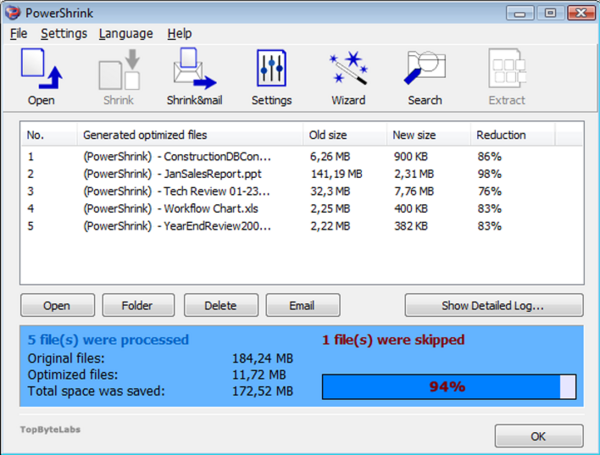
PowerShrink optimizes your files significantly. With compression rates with up to 98% be sure to save huge amounts of storage, and finally get E-Mails sent despite limitations.
Supported formats
Compress 16+ file types. Compress any of the following file formats: DOC, DOCX, XLS, XLSX, PPT, PPS, PPTX, ODS, ODT, ODP, ODF
Quality Control
With a brand new set of compression options you can be sure there is an compression option that suits your needs - and if not, define your own custom compression settings. No matter, your selection you will agree that PowerShrink is an extremely efficient compression tool.
What you see is what you get!
Make your life easy while searching your local or network drives for files to compress. Apply search filters to find only the files you really need to optimize. Select Size, Date or File Type or mix them freely to get the results you need.
MS Office Integration
Run PowerShrink directly from within your document, presentation or spreadsheet
Paste Images from clipboard
Drag-and-drop File compression. PowerShrink supports drag-and-drop file compression saving you time whenever you need to compress one or more files.
Set your own Image size and resolution
PowerShrink is redesigned to be simple and easy to use for new and experienced users. With our new comfortable user interface you will be able to optimize your files easily & effectively.
Multiple file optimization
PowerShrink lets you compress, native work files and deliver industry-standard files with tools that are easy to use, and easy on your budget.